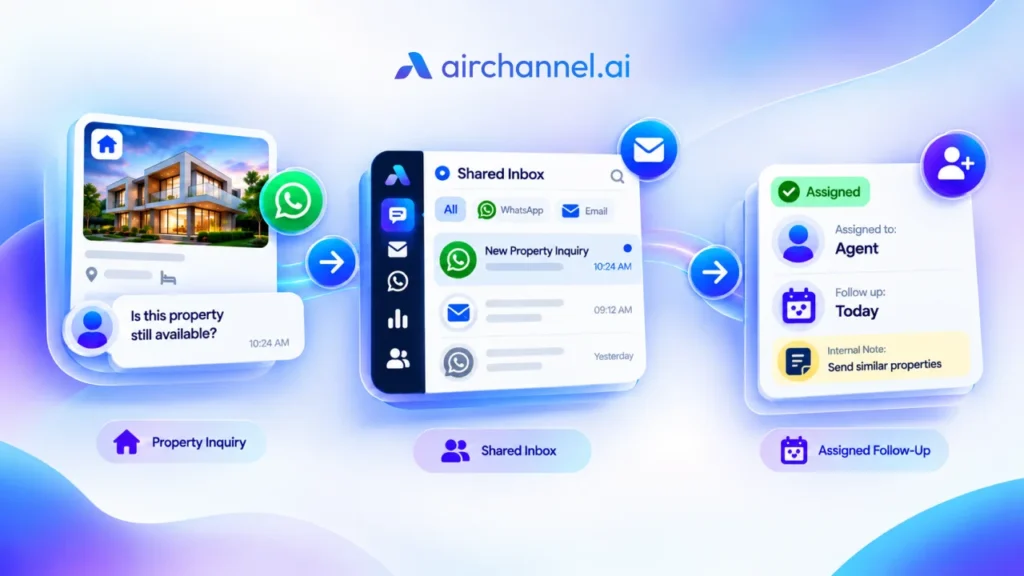
A customer emails your business on Monday morning. Someone else messages you on WhatsApp that same afternoon. A third person fills out your contact form and waits.
By Thursday, one of those three messages still has no reply. Nobody ignored it on purpose. It just got buried under a full inbox, a busy week, and no clear owner.
This happens to almost every growing business at some point. The instinct is usually to hire more people to keep up. But in most cases, the real problem isn’t a lack of hands. It’s a lack of visibility, ownership, and workflow.
This guide walks through why customer inquiries get missed, ten practical ways to fix that without adding headcount, and how to know if hiring is actually the right next step.
Featured Snippet Answer
To stop missing customer inquiries, centralize every channel into one place, assign clear ownership for each message, set response time targets, and build a simple follow-up system. Most missed inquiries happen because of scattered channels and unclear responsibility, not a shortage of staff. Fixing the workflow first is usually faster and cheaper than hiring.
AI Overview Summary
- Missed inquiries are usually a workflow problem, not a staffing problem
- Centralizing channels into one view solves most of the issue immediately
- Clear ownership and assignment rules prevent messages from being ignored
- Response time targets and status tracking keep teams accountable
- A workflow audit and decision tree show whether to fix process or hire
- A shared or unified inbox becomes useful once manual tracking breaks down
- The AIR Response Framework gives every message a repeatable path from arrival to resolution
- Hiring should follow process improvements, not replace them
Why Businesses Miss Customer Inquiries
Missed inquiries rarely happen because a team doesn’t care. They happen because of small gaps that add up over time, and the same five gaps show up again and again across growing businesses.
Messages are spread across too many channels. Email, WhatsApp, SMS, and contact forms all pull attention in different directions. A message in a channel nobody checks regularly can sit for days.
Nobody owns the inbox. When three people can technically answer a message, often none of them do. Each person assumes someone else will handle it.
There’s no tracking system. Without a way to mark a message as “in progress” or “resolved,” teams lose track of what’s been answered and what hasn’t.
Notifications get lost in the noise. A support inbox with hundreds of unread emails makes it easy for one urgent question to slip past everyone.
There’s no response time standard. If a team has never agreed on how fast a reply should happen, “eventually” becomes the default speed.
This pattern shows up constantly with growing ecommerce and service businesses. Customer inquiries arrive by email, WhatsApp, and contact form within the same hour, especially during a sale or product launch, and without a clear owner for each channel, two problems appear side by side: some customers get a duplicate reply from two different team members, and others get no reply at all. Both outcomes come from the same root cause, which is a missing system, not a missing person.
Customer expectations have also risen alongside this problem. Zendesk’s CX Trends research found that a majority of consumers now expect whoever they’re talking to on any channel to already have full context of their conversation, which makes scattered, disconnected channels feel even more broken to the customer on the other end.
Each of these problems is fixable without adding a single new hire. They’re workflow problems, not staffing problems.
Key Takeaway: Before assuming you need more people, check whether your channels, ownership rules, and tracking system are the actual source of the problem. Most teams find they are.
Why this matters: Missed inquiries damage trust fast, and customers rarely give a second chance after a bad first experience.
Biggest mistake: Assuming the cause is team size instead of checking for scattered channels or unclear ownership first.
Best action: Map every channel your business uses today and note who is actually responsible for each one.
Why Hiring More Staff Isn’t Always the Answer

Hiring feels like the obvious fix when messages pile up. But adding people to a broken workflow usually just means more people missing the same messages.
A new hire still has to check five different apps if that’s what the rest of the team does. A new hire still won’t know who’s responsible for WhatsApp versus email if that was never defined. The underlying confusion doesn’t go away. It just gets a bigger headcount.
Hiring also comes with real costs beyond salary: onboarding time, training, management overhead, and the risk of burnout if the new hire inherits the same chaos. Many small businesses discover that most of the problem hiring was meant to solve was actually a process gap that a week or two of workflow changes could have closed.
That doesn’t mean hiring is never the answer. It means hiring should come after the workflow has been improved, not before. If a fixed process still can’t keep up with genuine volume, that’s a real signal to grow the team.
Why this matters: Hiring adds cost and ramp-up time without guaranteeing the actual problem gets solved.
Biggest mistake: Hiring before fixing ownership and channel visibility, which just multiplies the confusion.
Best action: Run the Workflow Audit before opening a new job posting.
Hiring vs. Workflow: A Direct Comparison
Workflow fixes are almost always faster, cheaper, and closer to the root cause than hiring, which is why they should come first in nearly every case.
| Factor | Fixing the Workflow | Hiring More Staff |
| Time to implement | Days to a few weeks | Weeks to months (hiring, onboarding, training) |
| Cost | Usually low, often just time investment | Ongoing salary, benefits, management overhead |
| Fixes root cause | Yes, addresses ownership and visibility gaps directly | No, a new hire inherits the same broken process |
| Risk | Low, mostly requires team discipline | Higher, includes onboarding risk and ramp-up time |
| Best used when | Messages are missed due to scattered channels or unclear ownership | Volume genuinely exceeds capacity after workflow is fixed |
Key Takeaway: Treat hiring as Step 2, not Step 1. Fixing the workflow first often removes the need to hire at all.
Why this matters: Doing them in the wrong order means paying for a hire who inherits the exact same missed-message problem.
Biggest mistake: Comparing hiring cost to “doing nothing” instead of comparing it to a fixed workflow.
Best action: Complete the workflow fixes below, then reassess whether volume still justifies a hire.
10 Practical Ways to Stop Missing Customer Inquiries
These ten habits solve the majority of missed-inquiry cases, and they work best when used together rather than picked one at a time.
1. Centralize every channel into one place
Why it matters: When email, WhatsApp, and contact forms all live in separate apps, someone has to remember to check all of them constantly. That’s where messages fall through.
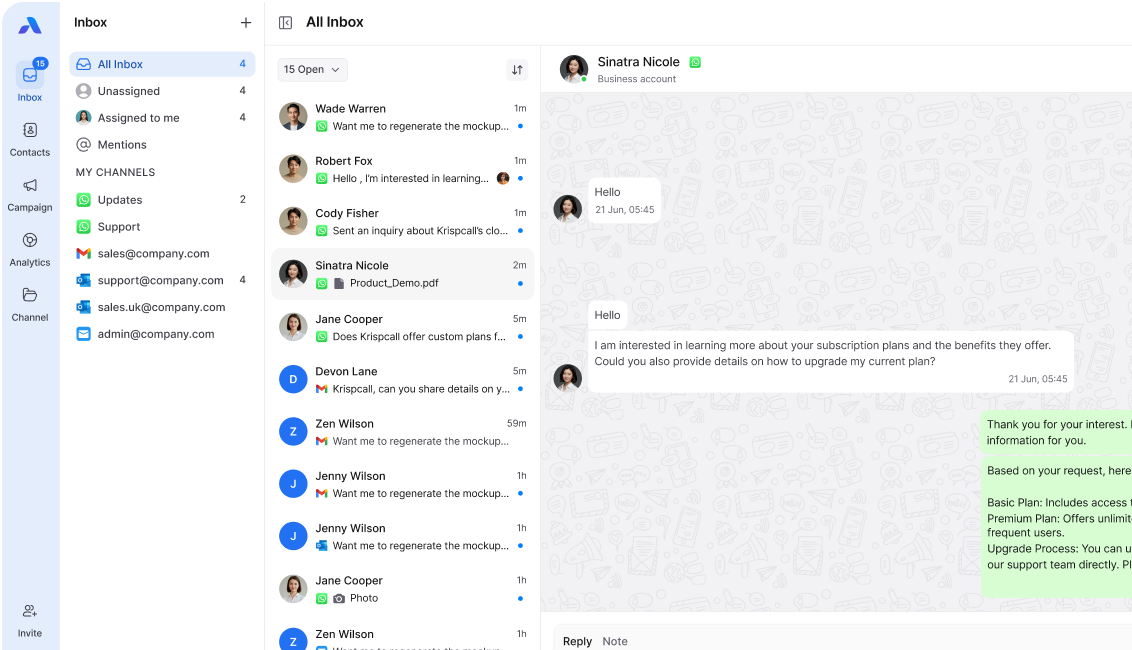
How to implement it: Bring every channel into a single shared inbox, where every team member can see the same conversation regardless of which app the customer originally used. The goal is one place to check, not five.
Common mistake: Centralizing channels but still letting individual team members reply from their personal email or personal WhatsApp instead of the shared system.
Real-world pattern: This is one of the most common fixes among small ecommerce teams running WhatsApp, email, and Instagram DMs at the same time. Once every channel funnels into a single unified view, replies stop depending on which app someone happened to have open that day, and duplicate replies from two team members answering the same message practically disappear.
2. Assign clear ownership for every inquiry
Why it matters: A message with no assigned owner is a message nobody feels responsible for.
How to implement it: Use conversation assignment so every incoming inquiry routes to a specific person or team the moment it arrives, either automatically or through a quick manual triage step each morning.
Common mistake: Assigning messages by channel instead of by topic, which leaves complex questions bouncing between people.
Real-world pattern: Support teams that switch from “whoever sees it first” to assigning every conversation within 15 minutes almost always see untouched conversations drop fast, simply because someone is always clearly on the hook.
3. Set a clear response time target
Why it matters: Without a target, “fast” and “slow” are just opinions. A number gives the whole team something to aim for.
How to implement it: Pick a realistic first-response target, such as under two hours during business hours, and track it weekly.
Common mistake: Setting a target that’s too aggressive for the team’s current capacity, which causes people to give rushed, unhelpful replies just to hit the clock.
Real-world pattern: HubSpot’s research on customer service metrics found that companies offering support across every channel their customers actually use consistently perform better on response time and satisfaction, which is a strong argument for setting a channel-specific target rather than one blanket number.
4. Use internal notes instead of forwarding messages
Why it matters: Forwarding a customer message to a coworker for input often means two inboxes now track the same conversation, doubling the chance of confusion.
How to implement it: Use internal notes attached directly to the conversation so context stays in one thread instead of scattered across forwarded emails.
Common mistake: Discussing a customer issue over a separate Slack thread that has no link back to the original conversation.
Real-world pattern: Managers who switch from forwarded-email approvals to internal notes on the original thread consistently report faster turnaround on escalated issues, since nothing gets lost jumping between two separate inboxes.
5. Build a simple triage system
Why it matters: Not every inquiry needs the same urgency. Treating a billing emergency the same as a general product question wastes time on both.
How to implement it: Sort incoming messages into two or three priority levels each morning, such as urgent, standard, and low priority, before anyone starts replying.
Common mistake: Triaging by channel instead of content, assuming all WhatsApp messages are urgent and all emails can wait.
Real-world pattern: A short daily triage, even five minutes, is enough to stop urgent issues from getting stuck behind routine questions in teams that previously had no sorting step at all.
6. Create response templates for common questions
Why it matters: A large share of customer inquiries repeat the same handful of questions. Writing the same answer from scratch every time wastes time that could go toward harder issues.
How to implement it: Build a small library of templates for the ten most common questions, then personalize each one before sending.
Common mistake: Sending templates that sound robotic and copy-pasted, which damages trust instead of building it.
Real-world pattern: Teams that build templates for shipping delays, refund status, and account setup, and train reps to personalize the opening line, consistently answer routine questions faster without sounding canned.
7. Track every conversation status
Why it matters: Without a visible status, like open, in progress, or resolved, teams lose track of what’s actually been handled.
How to implement it: Require every conversation to carry a status tag, and review open conversations at the end of each day.
Common mistake: Marking something “resolved” the moment a reply is sent, even if the customer hasn’t confirmed their issue is actually fixed.
Real-world pattern: A short daily review of anything still marked “open” is one of the fastest ways small teams catch quietly abandoned conversations before a customer has to follow up angrily.
8. Reduce channel switching for your team
Why it matters: Every time someone switches between apps to answer messages, they lose focus and speed.
How to implement it: Give your team one primary place to work from, with a unified inbox or dedicated WhatsApp team inbox feeding every channel into it, instead of asking them to juggle multiple tabs and apps all day.
Common mistake: Consolidating channels for reporting purposes but still requiring the team to reply from each app separately.
Real-world pattern: Sales teams replying to leads across four separate apps consistently cut their time per response once they move to one shared workspace, because nobody has to hunt for context anymore.
9. Set clear escalation rules
Why it matters: Some inquiries need a manager or specialist. Without clear rules, these messages sit waiting for someone to notice them.
How to implement it: Define two or three trigger conditions for escalation, such as a customer mentioning “refund,” “cancel,” or “legal,” and route those instantly to the right person.
Common mistake: Relying on individual judgment for every escalation instead of having agreed-upon rules the whole team follows the same way.
Real-world pattern: An automatic tag for any message containing a word like “cancel” reliably gets retention-related conversations to a manager fast, instead of sitting in a general queue with everything else.
10. Review performance weekly, not just when something breaks
Once the first nine habits are in place, the tenth is what keeps them from slipping.
Why it matters: Most missed inquiries only get noticed after a customer complains publicly. A regular review catches problems earlier.
How to implement it: Spend 15 minutes each week reviewing average response time, number of missed messages, and any patterns in complaints.
Common mistake: Only reviewing performance after a crisis, which means the same gaps repeat month after month.
Real-world pattern: A short Friday review of response metrics is often enough for a founder to spot that one channel is consistently the slowest, well before it becomes a bigger issue.
Key Takeaway: These ten habits work together. Centralizing channels without assigning ownership just creates one big unassigned inbox instead of five small ones.
Quick Answer: What’s the fastest fix for missed customer inquiries?
Why this matters: Trying to fix everything at once usually stalls out. A clear starting point gets results faster.
Biggest mistake: Starting with templates or escalation rules before channels are even centralized.
Best action: Start with Tip 1 (centralize channels) and Tip 2 (assign ownership) before moving to the rest.
The AIR Response Framework
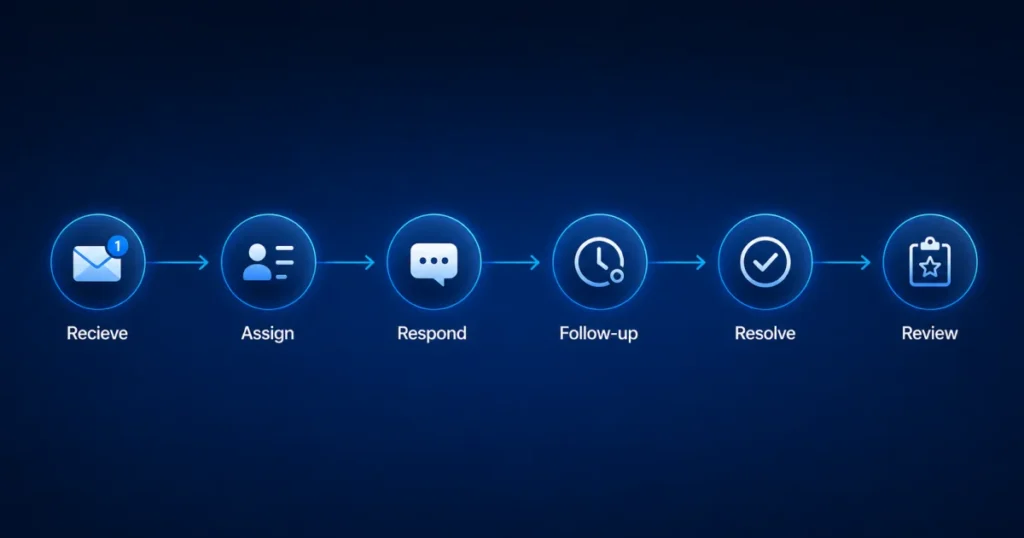
Every inquiry, no matter the channel, moves through the same six stages. Giving each stage a name makes it easier to spot exactly where a message is falling through.
R – Receive. The message arrives, regardless of channel (email, WhatsApp, SMS, contact form).
A – Assign. The message is routed to a specific, named owner within minutes, not hours.
R – Respond. The owner sends a first reply that meets the team’s agreed response time target.
F – Follow Up. If the issue isn’t resolved in the first reply, a follow-up is scheduled rather than left open-ended.
R – Resolve. The customer confirms their issue is actually fixed, not just that a reply was sent.
R – Review. The conversation is checked off in the weekly performance review to catch any pattern worth fixing.
Most missed inquiries fail at one of exactly two stages: Assign or Follow Up. A message that’s never assigned has no owner to begin with. A message that gets a first reply but no follow-up looks “handled” on paper while the customer is still stuck.
Key Takeaway: Use the AIR Response Framework as a diagnostic. When a message slips through, ask which of the six stages broke down instead of assuming the whole process failed.
Why this matters: It gives every team member the same mental model for handling a message from arrival to resolution.
Biggest mistake: Treating “respond” and “resolve” as the same step, when a fast reply doesn’t always mean the issue is fixed.
Best action: Print the six stages and check new conversations against them for a week to see where yours typically break down.
Customer Inquiry Workflow Audit
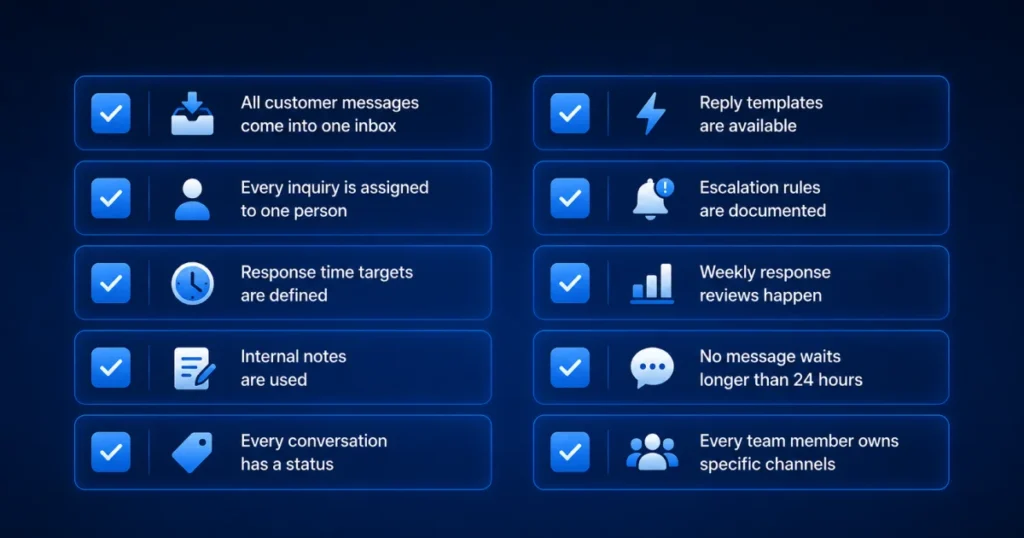
Use this checklist to see where your current workflow is losing messages. Check off each item that’s true for your team today.
- Every channel (email, WhatsApp, SMS, contact form) feeds into one place my team checks
- Every new inquiry gets assigned to a specific person within 30 minutes
- We have an agreed response time target for each channel
- We use internal notes instead of forwarding customer messages elsewhere
- Every conversation has a visible status (open, in progress, resolved)
- We have templates ready for our most common questions
- We have clear rules for what gets escalated and to whom
- We review response time and missed messages at least weekly
- No customer message currently sits unanswered for more than 24 hours
- Everyone on the team knows exactly which channels they’re responsible for
If you checked fewer than 6 of these, workflow gaps are likely the main reason inquiries are getting missed, not team size.
Why this matters: A quick, honest self-check reveals whether the problem is process or capacity before you spend money on either.
Biggest mistake: Scoring generously instead of checking each item against what actually happens this week.
Best action: Score below 6? Start the 30-Day Roadmap below before considering a hire.
Decision Tree: Should You Improve Workflow or Hire More Staff?
Step 1: Are messages spread across multiple channels with no central view? If yes, fix centralization first. This alone solves a large share of missed inquiries.
Step 2: Does every inquiry have a clear, assigned owner within 30 minutes? If no, fix ownership and assignment before considering new hires.
Step 3: Do you have a tracked response time target you’re consistently missing? If you’re missing it because of unclear process, fix the workflow. If you’re missing it because your team is genuinely at full capacity with a solid process in place, hiring may help.
Step 4: Have you completed the Workflow Audit above and checked at least 8 of 10 items? If yes, and inquiry volume still exceeds what your team can realistically handle, hiring is likely the right next step.
Step 5: Is volume growing faster than any process improvement can absorb? If yes, plan a hire, but bring them into an already-improved workflow rather than the same chaos.
Customer Communication Maturity Model
Most businesses start at Level 1 or 2 without realizing it, and can reach Level 4 within 30 days using the steps in this guide, without hiring anyone new.
| Level | Name | What It Looks Like | Typical Result |
| 1 | Scattered | Channels are separate, no ownership, no tracking | Frequent missed inquiries, slow response times |
| 2 | Aware | Team knows there’s a problem but has no formal process yet | Occasional missed messages, inconsistent response times |
| 3 | Structured | Channels partially centralized, basic assignment rules exist | Fewer missed messages, response times improving |
| 4 | Managed | Centralized inbox, clear ownership, tracked status, response targets | Rare missed messages, predictable response times |
| 5 | Optimized | Full centralization, automation for routing and escalation, weekly reviews | Near-zero missed messages, response time as a competitive advantage |
Key Takeaway: Reaching Level 4 is a workflow achievement, not a headcount achievement. Level 5 is where dedicated software like a shared inbox starts to matter most.
Quick Answer: What is the customer communication maturity model?
Why this matters: It gives you a benchmark for where your team stands today and what “better” actually looks like.
Biggest mistake: Assuming you need Level 5 tools when you haven’t fixed the ownership gaps that keep you at Level 1 or 2.
Best action: Identify your current level honestly, then focus only on what’s needed to reach the next one.
Manual Inbox vs. Shared Inbox
Manual inboxes work at low volume, but a shared inbox becomes worth the switch once a team juggles multiple channels or more than a handful of daily conversations.
| Factor | Manual Inbox (Email + Spreadsheets) | Shared Inbox |
| Visibility across channels | Low, requires checking each app separately | High, all channels in one view |
| Ownership tracking | Manual, easy to lose track | Built-in assignment per conversation |
| Risk of duplicate replies | Higher, especially with shared logins | Low, conversations are assigned to one owner |
| Scales with team growth | Breaks down past a few people | Designed to scale with team size |
| Best fit | Very small teams, low message volume | Teams juggling multiple channels or growing volume |
Why this matters: Knowing the breaking point helps you switch before customers notice the strain, not after.
Biggest mistake: Waiting for a visible failure, like a public complaint, before considering a shared inbox.
Best action: If your team is juggling more than one channel with daily conversations, compare a shared inbox now.
When a Shared Inbox Becomes the Right Solution
Manual workflow fixes can take a team a long way. But once a business is juggling multiple channels with more than a handful of daily conversations, manual tracking through spreadsheets or memory starts to break down.
This is usually the point where a shared inbox becomes genuinely useful rather than a nice-to-have, since it helps every team member see the same conversation and history instead of relying on someone remembering to check five different apps.
Pairing that with conversation assignment solves the ownership problem directly, since every inquiry gets routed to a specific person the moment it arrives. For teams juggling email and WhatsApp together, a unified inbox or a dedicated WhatsApp team inbox removes the channel-switching that slows teams down, while internal notes and shared team collaboration tools keep context in one thread instead of scattered across forwarded messages.
If your team is still relying on a shared email inbox built from a shared login and hoping nobody double-replies, a proper shared inbox setup solves that same problem with far less risk. Tools built for omnichannel communication, like AirChannel, exist specifically to support Levels 3 through 5 of the maturity model above, once workflow alone isn’t enough. You can see how the full setup works on the how it works page, or explore the complete features list.
If you haven’t already, it’s worth reading about why customer messages get lost in the first place, which this article’s companion piece covers in more depth.
The right sequence is workflow first, then software to support that workflow at scale. Software without a workflow behind it just becomes another place messages can get lost.
Why this matters: Switching too early wastes money; switching too late costs missed customers.
Biggest mistake: Buying software before fixing ownership, then blaming the tool when messages still get missed.
Best action: Compare your Workflow Audit score against your current channel volume before deciding.
Final Checklist Before Hiring
Before adding a new team member to handle customer inquiries, confirm:
- You’ve completed the Workflow Audit
- Your team has a centralized view of every channel
- Every inquiry is assigned within 30 minutes, without exception
- You have a tracked, agreed response time target
- You’ve reviewed the last four weeks of response data and volume is genuinely outpacing capacity
- You’ve identified exactly which part of the workflow a new hire would own
If you can’t confirm all six, invest another two to four weeks in workflow improvements first. Many teams find the “hiring problem” disappears once these are in place.
30-Day Implementation Roadmap
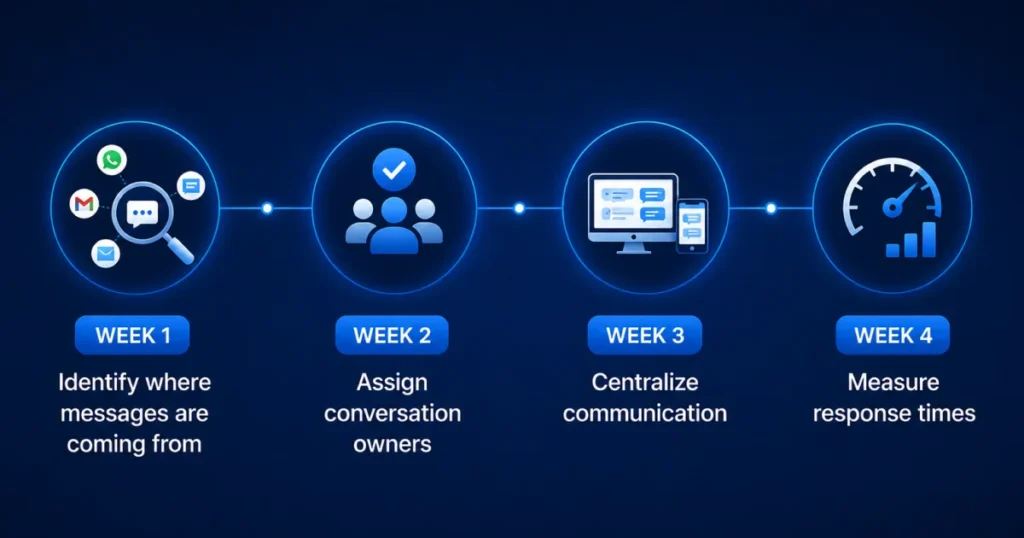
Week 1: Centralize and audit. Bring all channels into one view. Complete the Workflow Audit checklist honestly.
Week 2: Assign and track. Introduce clear ownership rules for every inquiry. Add a status tag system for open, in progress, and resolved.
Week 3: Standardize and template. Set response time targets per channel. Build templates for your ten most common questions.
Week 4: Review and refine. Run your first weekly performance review. Adjust ownership rules or escalation triggers based on what the data shows.
Monthly Review Checklist
Once the 30-day roadmap is complete, keep the system healthy with a monthly check:
- Average first response time by channel
- Number of inquiries left unanswered past 24 hours
- Percentage of inquiries hitting your response time target
- Any recurring questions that need a new template
- Whether current volume still matches your team’s realistic capacity
- Any channel that’s consistently slower than the others
Conclusion
Missed customer inquiries are almost always a workflow problem before they’re a staffing problem. Centralizing channels, assigning clear ownership, tracking status, and reviewing performance regularly solve the majority of cases without adding a single new hire.
Work through the Workflow Audit, follow the 30-day roadmap, and use the decision tree honestly before deciding to hire. If you’ve genuinely maxed out a well-run process, hiring is a reasonable next step. Most teams find they never get there, because the workflow fix was the real solution all along.
Hiring adds capacity. Good workflows create reliability. Build the workflow first, then decide whether you truly need another person.
Start with the Workflow Audit above. If your team checks fewer than 8 of the 10 items, improve those first before evaluating shared inbox software.
If your team eventually outgrows manual tracking, it’s worth reading about why businesses lose WhatsApp leads and exploring best shared inbox software to compare your options, or start with our broader guide to preventing lost customer messages.
People Also Ask
What causes businesses to miss customer messages?
Scattered communication channels, no assigned ownership, and no tracking system are the most common causes. Team size is rarely the actual root cause.
How do I know if I need a shared inbox?
If your team checks more than one channel and struggles to know who replied to what, a shared inbox likely saves time immediately.
What’s a good first response time for customer inquiries?
Many teams aim for under two hours during business hours for email and under 30 minutes for real-time channels like WhatsApp, adjusted to what their customers expect.
Can small teams fix missed inquiries without new software?
Yes. Centralizing channels, assigning ownership, and tracking status can be done manually first, especially for teams under five people.
What’s the difference between customer communication and customer support?
Customer communication covers every message exchanged with a customer across any channel. Customer support is the function responsible for responding to and resolving those messages.
Frequently Asked Questions
Why do we keep missing customer inquiries even with a full team?
Missed inquiries usually happen because of scattered channels, unclear ownership, and no tracking system, not because of team size. A structured workflow often fixes the problem faster than hiring.
How fast should we respond to customer inquiries?
A common target is under two hours during business hours for email and under 30 minutes for real-time channels like WhatsApp. The right target depends on your industry and customer expectations.
Do we need a shared inbox if we’re a small team?
If you’re juggling more than one channel with several daily conversations, a shared inbox usually saves time immediately. Teams under five people can sometimes manage with strict manual processes, but it gets harder as volume grows.
What’s the difference between a shared inbox and a unified inbox?
A shared inbox typically centralizes one channel type, like email, for a team. A unified inbox brings multiple channels, such as email, WhatsApp, and SMS, into a single view.
How do we know if it’s time to hire more support staff?
Complete a workflow audit first. If your process scores well but volume still exceeds what the team can handle, hiring is likely the right move.